
About Financial Board
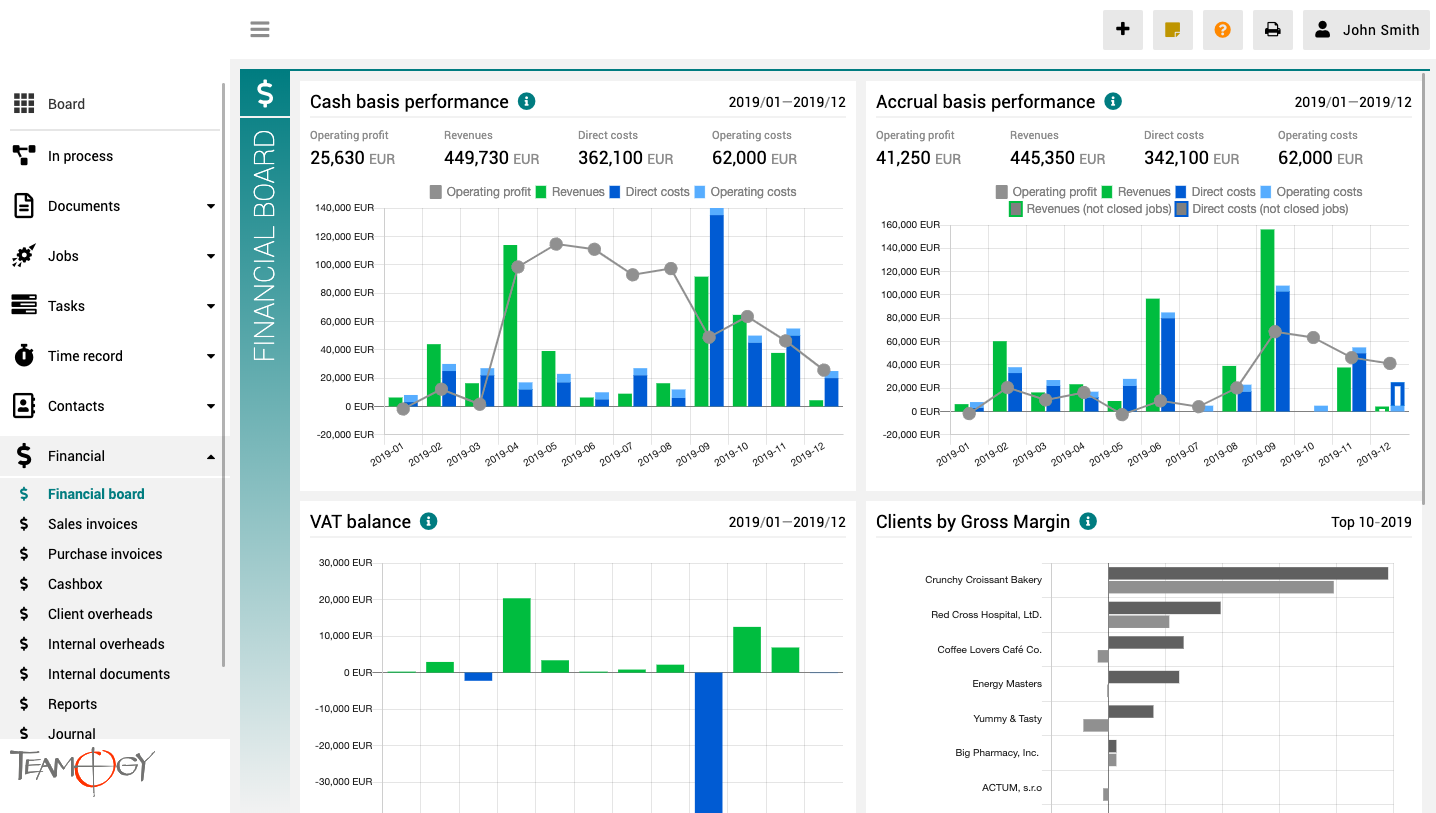
The finance board is a place that provides a clear view of the entire company. It contains charts with key indicators – overall evolution of revenues and costs of the company, according to financial and Job aspects, various views on client profitability and efficiency, and VAT report.
All charts have the option to select a date period while client reports also have the option to monitor the best and worst ranked clients.
Cerrar sesión
Cerrar sesión1. 1. Haga clic en su nombre en el área de usuario en la esquina superior derecha de la pantalla.2. Haga clic en Cerrar sesión.3. Ahora ha cerrado sesión.Por razones de seguridad, le recomendamos que cierre la sesión cada vez que haya terminado su sesión...
Problemas con el inicio de sesión en Teamogy
Problemas con el inicio de sesión en TeamogySi tiene un problema al ingresar a Teamogy, pruebe uno de estos consejos. 1. Utilice métodos abreviados del teclado para volver a cargar la página Web abierta actualmente e intente iniciar sesión de nuevo en el sistema....

Onboarding the whole team in Teamogy
Well-managed onboarding or team launch is important for the successful deployment and effective use of each new system.
How To Change The Participant Of The Process
How To Change The Participant Of The ProcessYou can easily change the participant of Process, that will approve the next step of the Process. You must have the appropriate permissions for these changes. 1. Go to your Document/Financial Document with the Process. 2. On...
New Opportunity
New Opportunity1. In the left navigation menu, select unroll Opportunities. 2. Click on Opportunity statuses (Kanban) or Opportunity list. 3. Click on New Opportunity.4. Complete all details. Mandatory fields are red underlined (can be different by company’s...
Time Records – Report
Time Records - ReportsTime records - Reports enablee you to see how many hours should be reported and how many hours are already reported. It gives you a perfect overview if someone didn’t report his/her time or reported many hours above the normal limit, etc. You can...

Keep invoicing under your thumb
BLOGKeep invoicing under your thumbInvoicing clients is a necessary administrative activity, and without it, the company would not make any money. For many, however, invoicing is more of a bother.Some people postpone invoicing by the deadline because it is an...
Bulk Changes In Teamogy
Bulk Changes In Teamogy You have an option of bulk changes in Jobs/ Tasks/ Client Overheads/ Internal Overheads. You can mark the data and change their fields. In Jobs, you can change the field - Owner, Participants, Start date, End date, Status or Binder. In Tasks,...
How To Edit Attendances
How To Edit AttendancesYou can edit all the created Attendances of the whole team and also create new Attendances retrospectively. To have rights to edit Attendances, you have to be added in the Group - Attendance editor. 1. Go to the Attendance in the Financial...
About Sprints
About SprintsSprints are used to plan and complete a specific list of Tasks. They allow you to manage and have an overview of all important activities related to the Tasks. Sprints are limited to a specific period of time during which specific Tasks must be completed...
Get in Touch
If you have problem or need further assistance, do not hesitate contact Teamogy Support. Use online chat (inside Teamogy or everywhere on www.Teamogy.com in the lower right corner) and you will get prompt reply.