
About Financial Board
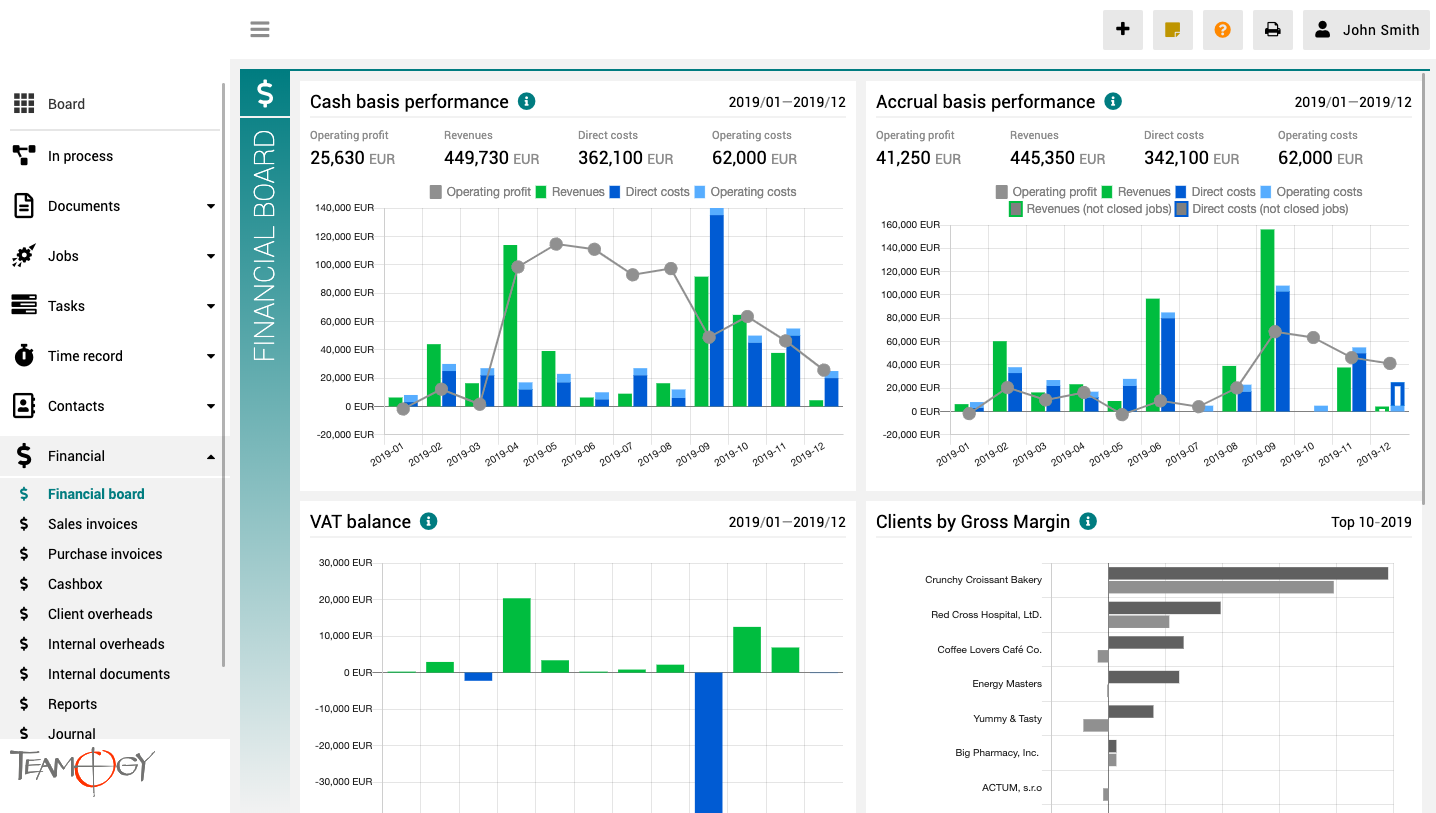
The finance board is a place that provides a clear view of the entire company. It contains charts with key indicators – overall evolution of revenues and costs of the company, according to financial and Job aspects, various views on client profitability and efficiency, and VAT report.
All charts have the option to select a date period while client reports also have the option to monitor the best and worst ranked clients.
How To Clone in Teamogy
How To Clone in TeamogyCloning in Teamogy is a quick and easy way how to create the same Document (Job, Invoice etc.) from existing one. In every element of Teamogy you could use CLONE button. This manual will show you How To Clone a Document. But you could apply this...
Cancelling Process
Cancelling ProcessIf you have set up the process to your system, there is option to Cancel the process. This feature is available for users with advanced rights. By doing this action you will not cancel the whole document, but only the Process! There is important...
Cancelling Documents
Cancelling DocumentsThe system enables you to Cancel the whole document. Use the button for advanced editing and Cancel the document. If you did it right, then in the proper view you will see that the document is Cancelled and the print overview will be marked with...
Closing remarks on Jobs
Closing remarks on JobsYou can add closing remarks that will be shown in Report. Here you can specify for example: why the specific Job is not profitable. You can add closing remarks in the Job.Go to the Reports and you can see an icon of the closing remarksGet in...
Record time from Job straight to the specific items
Record time from Job straight to the specific itemsYou can easily record/track time from Job straight to the specific item. Check the GIF below.Get in Touch If you have problem or need further assistance, do not hesitate contact Teamogy Support. Use online chat...
Meeting report with Tasks
Meeting report with TasksThe Meeting report is smoothly working with Tags. If you have tagged the Meeting report with the same tag as Tasks, the system will automatically offer you the tab inside the Meeting report with Tasks that have the same Tag. It is really...
Version 3.3
What is new in 3.2 version?
Attendance, changes in user area and Gems.
Job lifecycle
Job lifecycleRoles on Job Owner - User who manage the job and have responsibility for realisation (set on job) Participants - User(s) who participate on the job realisation (set on job) Job supervisor - User(s) who can supervise all jobs (system role) Job approver -...
Password change
Password Change You can easily change your Password to the system. 1. Click on your photo in User area in the top right corner of the screen.2. Click on User settings.3. Click on the option Password change.4. Enter your old Password and new Password (New Password...
About Attendance
About AttendanceThis functionality in Teamogy allows the company to track and monitor Attendance of their employees. It shows how much time each employee spends in work each day. Attendance enables you to track late arrivals, early departures and time taken on breaks....
Get in Touch
If you have problem or need further assistance, do not hesitate contact Teamogy Support. Use online chat (inside Teamogy or everywhere on www.Teamogy.com in the lower right corner) and you will get prompt reply.