
About Financial Board
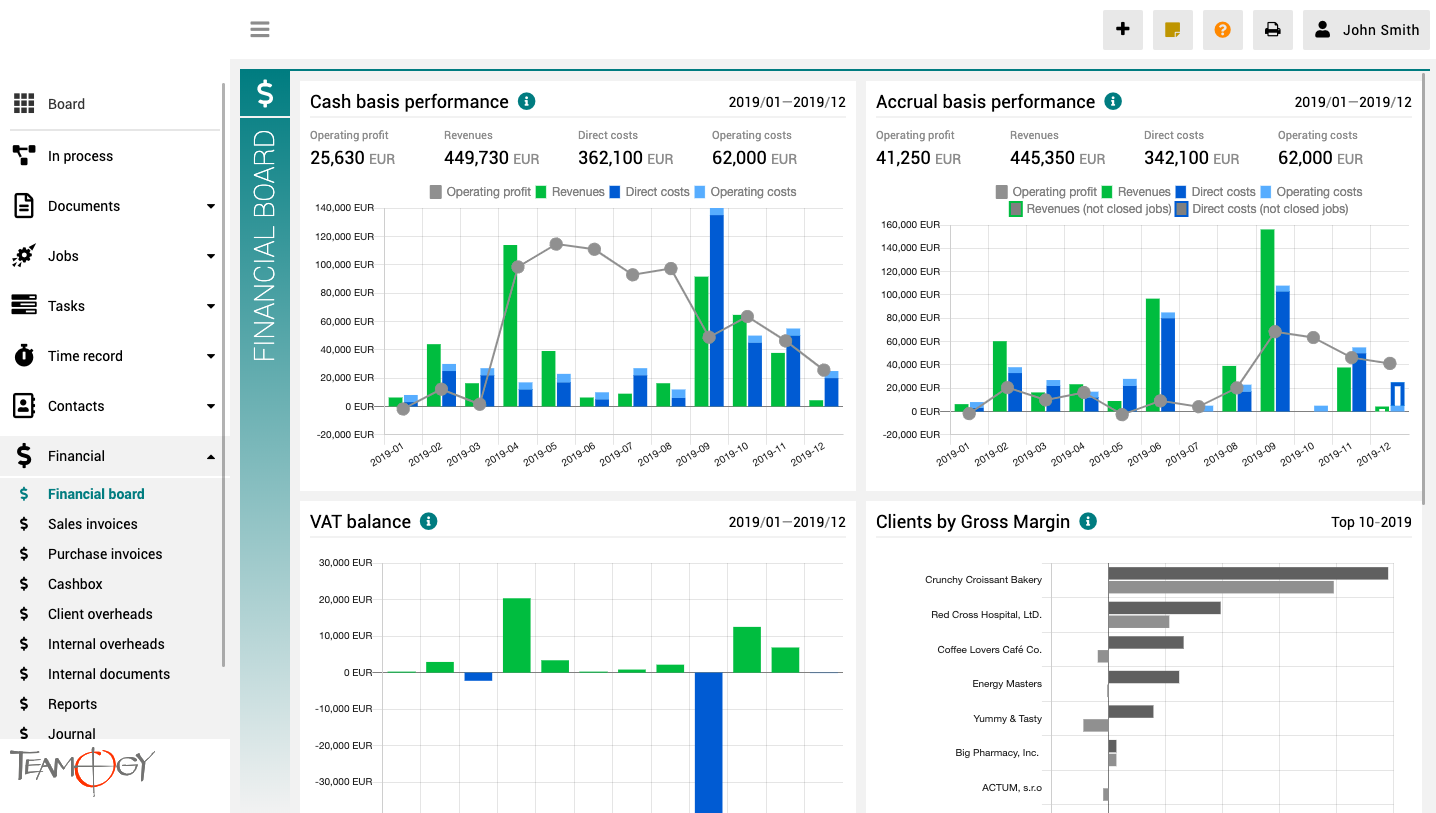
The finance board is a place that provides a clear view of the entire company. It contains charts with key indicators – overall evolution of revenues and costs of the company, according to financial and Job aspects, various views on client profitability and efficiency, and VAT report.
All charts have the option to select a date period while client reports also have the option to monitor the best and worst ranked clients.
About Sales Quotation
About Sales QuotationSales Quotation is a key document in Teamogy system. A well-crafted quotation is crucial for completing a profitable job. Ensure that you have the document design and also the content under control before it leaves the company. Making a quotation...
About General Document
About General DocumentDocument is a basic document type in the Teamogy system. Use Document to create a simple document like a letter, an invitation, or any general document. It enables you to easily create documents with a header and body text. You can easily format...
Version 2.2
What's new in Teamogy 2.2 Release date: 2019-04-13 Improvements Currency rates can be downloaded from national banks - Czech National Bank, Polish National Bank and European Central Bank More information displayed in visual Time recorder in each Time record -...
Print Optimization
Print OptimizationRemove Headers and Footers If you do not like the default Teamogy Headers and Footers, we will show you how to disable it. 1. Find Document which you would like to Print out. 2. Click on the icon of the printer.3. Select unroll More Settings. 4. At...
Send Sticker
Send Sticker1. Add new Sticker. 2. Click on the icon of the envelope. Choose the person you want to send sticker to.3. The sticker is sent to your colleague and will be displayed on his / her dashboard.Get in Touch If you have problem or need further assistance, do...
Version 2.1
What's new in Teamogy 2.1 Release date: 2019-04-01 Improvements New options in Time report - Jobs, Tasks, Client Overheads, Internal Overheads Possibility to send Sticker to colleagues The "whisper" in Quotation, Sales and Supplier invoice, Task or Time Track...
New Time Record From Capacity Plan
New Time Record From Capacity PlanA Time Record can also be logged directly from the Capacity plan. It’s very useful for users that work on Tasks. Once a portion of the work is finished on a given Task, let’s get a record of the spent time. Click on the Task that you...
Create A Task From Job
Create A Task From Job1. In the left navigation menu unroll Jobs. 2. Click on Job Statuses or Job List and choose existing Job. 3. Click on Task.4. Complete All Details. Mandatory Details are red underlined (can be different by company’s settings). Start date the...
Capacity Plan – Layout
Capacity Plan - LayoutCapacity Plan is a visual overview of all Tasks assign to a person, team or the entire company. Action bar includes following options: 1. Choosing the person or team here you can choose the person or team. All Tasks for the person/team are...
About Task List
About Task ListTask List is an overview of all created Tasks, which can be sorted and filtered by various criteria. The most important criteria is the author of the Task or the responsible person for the Task. You can sort by: Assigned to me or participating in the...
Get in Touch
If you have problem or need further assistance, do not hesitate contact Teamogy Support. Use online chat (inside Teamogy or everywhere on www.Teamogy.com in the lower right corner) and you will get prompt reply.