
About Financial Board
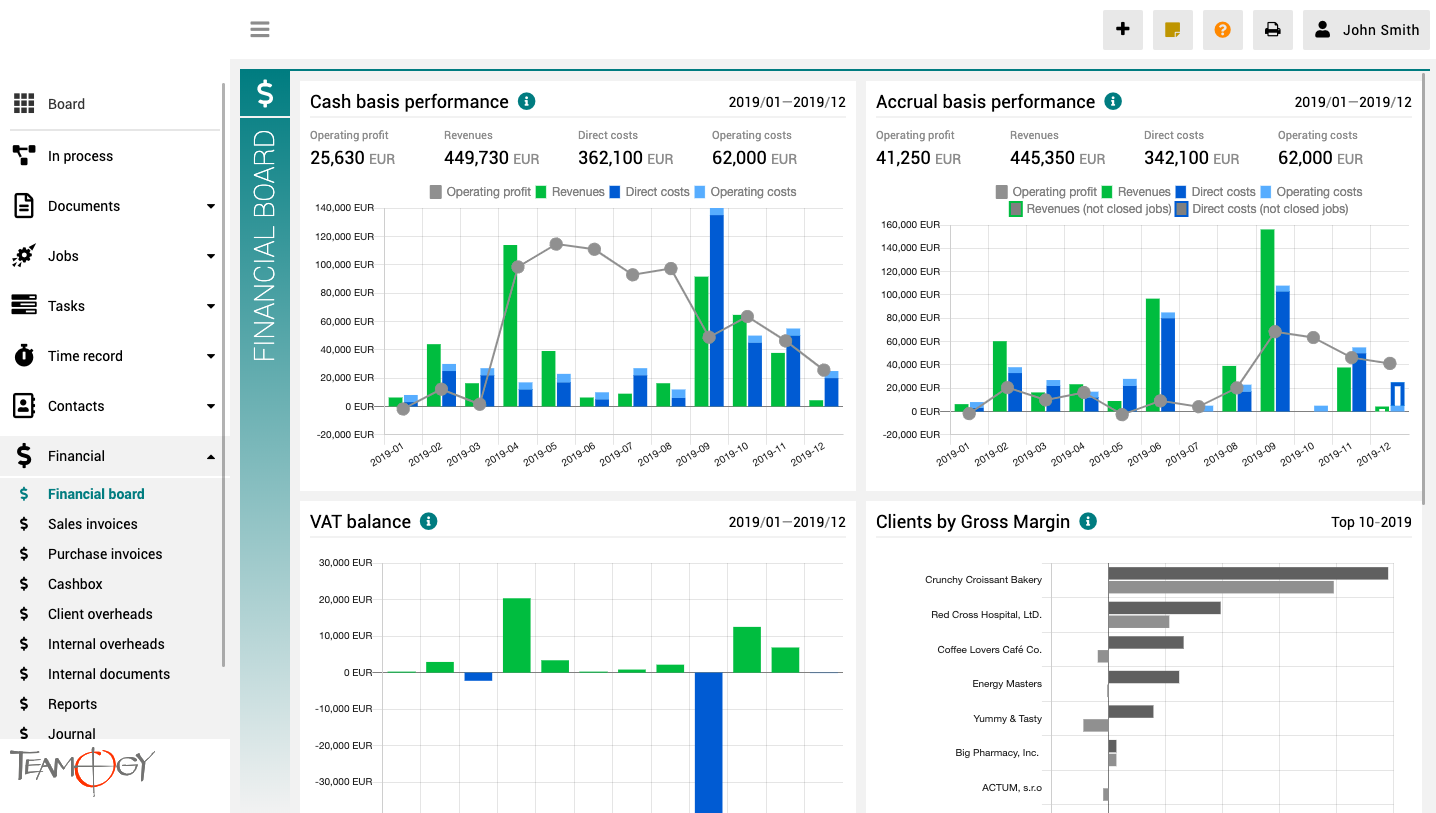
The finance board is a place that provides a clear view of the entire company. It contains charts with key indicators – overall evolution of revenues and costs of the company, according to financial and Job aspects, various views on client profitability and efficiency, and VAT report.
All charts have the option to select a date period while client reports also have the option to monitor the best and worst ranked clients.
How To Allocate Money
How To Allocate Money 1. Create Document (Sales Quotation, Purchase Order, Purchase Invoice, Timesheet, Bill Reimbursement) or Find it. 2. Complete all details. Mandatory fields are red underlined (can be different by company’s settings). 3. Pair element to a Job/...
About Jobs
About JobsThe Job is the central point of the entire system. The Quotation for the client is projected into the Job, Supplier costs are allocated, Client invoices are issued, tasks are assigned, and tracked time are all allocated for the Job. As a result, you have a...
Create A Job
Create A Job1. In the left navigation menu, unroll Jobs section. 2. Click on the Job schedule (Gantt), Job statuses (Kanban) view or Job list view. 3. Click on the New Job button.4. Complete all of the details. Mandatory fields are red underlined (can be different...
PrintEvery element of Teamogy you could Print out. This manual will show how to Print a Document. But you could apply this manual to all elements of Teamogy, which are printable. 1. Find the Document which you would like to Print out. 2. Click on the icon of the...
Add Attachments
Add AttachmentsIn every element of Teamogy you could Add Attachments. This manual will show how to Add Attachment to a Document. But you could apply this manual to all elements of Teamogy. 1. Create Basic Document, Sales Quotation , Purchase Order, Contract, Meeting...
Search Records and Documents
Search Records and DocumentsThe aim of Teamogy is to be user-friendly and effective software. Search Records and Documents is very simple. You can use a search engine or breadcrumbs. Breadcrumbs Use filters to work more efficient with your Documents. Just go to the...
Views And Breadcrumbs
Views And BreadcrumbsViews In Teamogy we have many Views. Simply, it is a page, where you are actually working. It is a very helpful tool in communication with your intern Teamogy admin or professional support team. You could easily describe, where is the problem that...
Version 1.11
What's new in Teamogy 1.11 Release date: 2019-03-15 Improvements Online chat has been moved to orange icon in top right screen corner Warning when leaving unsaved page (possible to enable/disable this warning in personal preferences) Easy time report from the...
Document Header Setup
Document Header SetupThe document header consists of your company logo and the default information that is common for commercial correspondence. However, Teamogy is a very flexible system and the document header can be also adjusted or modified. Please contact your...
About Dashboard
About DashboardDashboard is a homepage of your Teamogy. When you log in, Dashboard is the first page you will see on your display. On Dashboard you can see agency favourite links which can be customized for any agency. You can also see a List of Colleagues from your...
Get in Touch
If you have problem or need further assistance, do not hesitate contact Teamogy Support. Use online chat (inside Teamogy or everywhere on www.Teamogy.com in the lower right corner) and you will get prompt reply.