
O Pulpicie finansowym
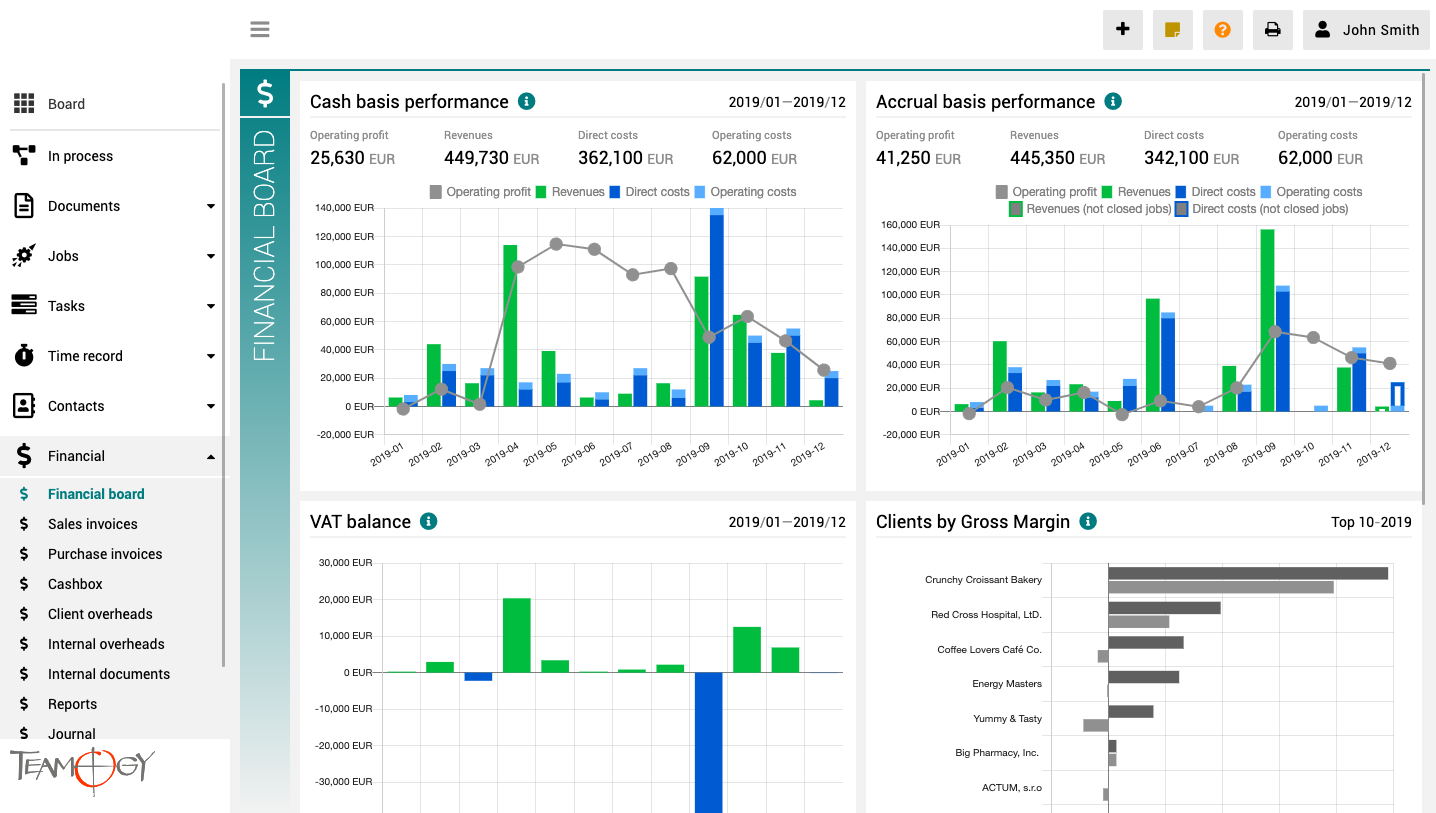
Pulpit finansowy to miejsce, które zapewnia wyraźny obraz całej agencji. Zawiera wykresy z kluczowymi wskaźnikami – ogólną ewolucję przychodów i kosztów agencji, zgodnie z aspektami finansowymi i jobu, różne poglądy na rentowność i wydajność klienta oraz raport VAT.
Wszystkie wykresy mają opcję wyboru zakresu dat, a dodatkowo raporty klientów mają również opcję monitorowania klientów najlepiej i najgorzej ocenianych.
How To Clone in Teamogy
How To Clone in TeamogyCloning in Teamogy is a quick and easy way how to create the same Document (Job, Invoice etc.) from existing one. In every element of Teamogy you could use CLONE button. This manual will show you How To Clone a Document. But you could apply this...
Cancelling Process
Cancelling ProcessIf you have set up the process to your system, there is option to Cancel the process. This feature is available for users with advanced rights. By doing this action you will not cancel the whole document, but only the Process! There is important...
Cancelling Documents
Cancelling DocumentsThe system enables you to Cancel the whole document. Use the button for advanced editing and Cancel the document. If you did it right, then in the proper view you will see that the document is Cancelled and the print overview will be marked with...
Closing remarks on Jobs
Closing remarks on JobsYou can add closing remarks that will be shown in Report. Here you can specify for example: why the specific Job is not profitable. You can add closing remarks in the Job.Go to the Reports and you can see an icon of the closing remarksGet in...
Record time from Job straight to the specific items
Record time from Job straight to the specific itemsYou can easily record/track time from Job straight to the specific item. Check the GIF below.Get in Touch If you have problem or need further assistance, do not hesitate contact Teamogy Support. Use online chat...
Raport de ședință cu Sarcini
Raport de ședință cu SarciniRaportul de ședință funcționează optim cu etichete. Dacă ați asociat Raportului de ședință aceeași etichetă ca Sarcinilor, sistemul vă va oferi automat în interiorul Raportului de ședință fila cu Sarcinile care au aceeași etichetă. Este un...
Version 3.3
What is new in 3.2 version?
Attendance, changes in user area and Gems.
Ciclul de viață al proiectului
Ciclul de viață al proiectuluiRoluri în cadrul Proiectului Proprietar - Utilizatorul care gestionează proiectul și are responsabilitatea realizării acestuia (setat pe proiect) Participanți - Utilizatorii care participă la realizarea proiectului (setați pe proiect)...
Schimbarea parolei
Schimbarea parolei Vă puteți schimba cu ușurință parola în sistem. 1. Faceți clic pe fotografia dumneavoastră din zona User area din colțul din dreapta sus al ecranului.2. Faceți clic pe User settings.3. Faceți clic pe opțiunea Password change.4. Introduceți parola...
About Attendance
About AttendanceThis functionality in Teamogy allows the company to track and monitor Attendance of their employees. It shows how much time each employee spends in work each day. Attendance enables you to track late arrivals, early departures and time taken on breaks....
Get in Touch
If you still have any questions or need further assistance, feel free to contact Teamogy support. You can use Online chat (inside the Teamogy or anywhere on www.teamogy.com in bottom right corner) and you will receive a prompt reply.