
O Pulpicie finansowym
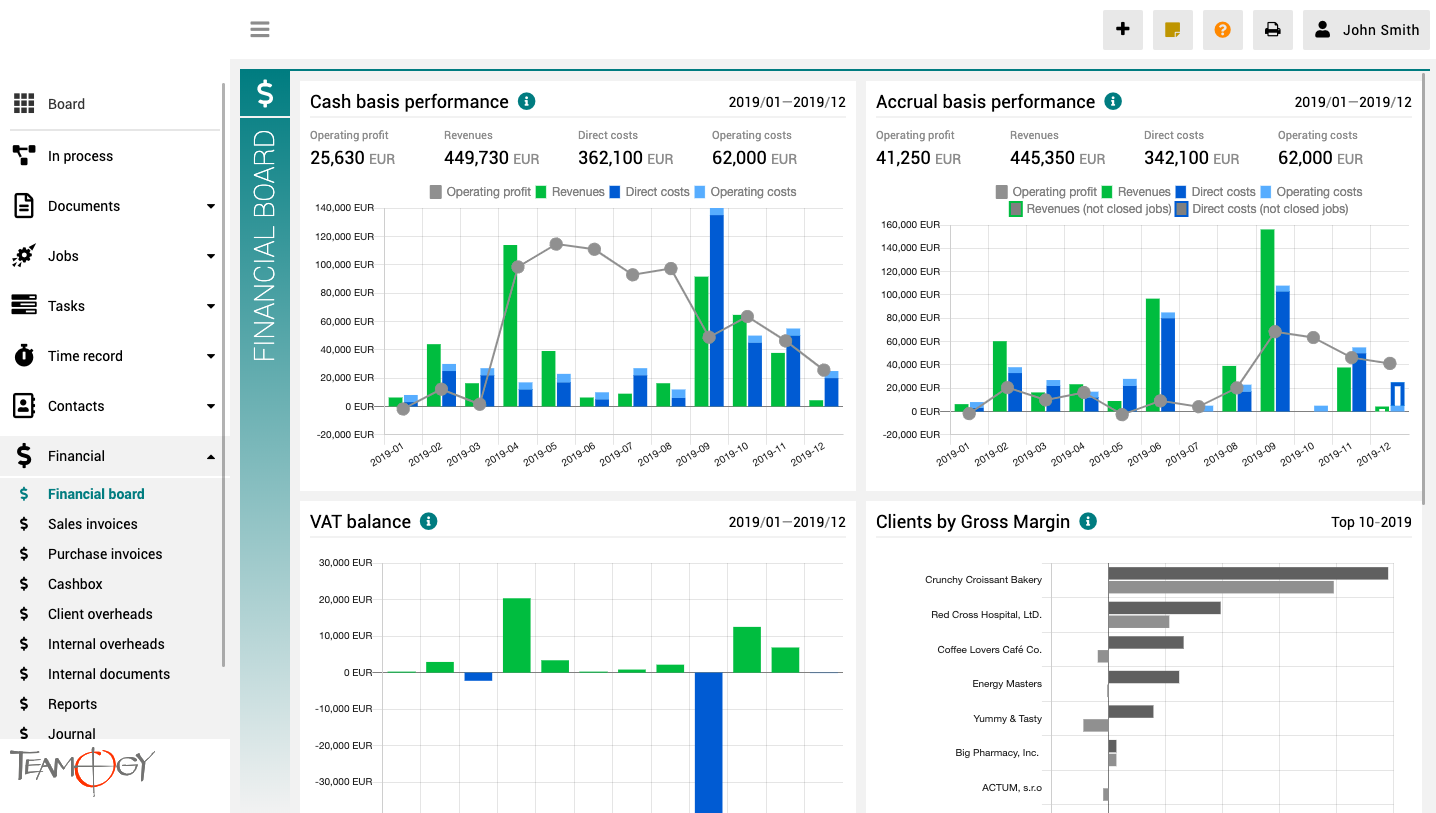
Pulpit finansowy to miejsce, które zapewnia wyraźny obraz całej agencji. Zawiera wykresy z kluczowymi wskaźnikami – ogólną ewolucję przychodów i kosztów agencji, zgodnie z aspektami finansowymi i jobu, różne poglądy na rentowność i wydajność klienta oraz raport VAT.
Wszystkie wykresy mają opcję wyboru zakresu dat, a dodatkowo raporty klientów mają również opcję monitorowania klientów najlepiej i najgorzej ocenianych.
How to Set Up the Calendar
How to Set Up the Calendar In this short manual, we will show you how to configure the Calendar in Teamogy and choose which types of records you want to display. Calendar settings are configured separately for each user. This means that every user can adjust the...
Leads
LeadsIn this short manual, we will introduce Leads in Teamogy and explain how they can be used to record and manage potential business contacts before an Opportunity is created.A Lead represents an initial contact or a potential business case that is still at an early...
Calendar
CalendarIn this short manual, we will introduce the Calendar in Teamogy and explain what information it can display and how you can use it. The Teamogy Calendar brings together events, planned work, absences and ToDos in one place. Each user can choose which types of...
Version 6.3
What’s new in Teamogy? Check out the latest Release notes.
Version 6.2
What’s new in Teamogy? Check out the latest Release notes.
ToDo – Small and Quick Tasks
ToDo - Small and Quick Tasks The ToDo feature introduces a new universal tool for assigning small operational tasks across the entire Teamogy system. ToDo items are designed as small and quick tasks that can be: created on any entity in the system, created...

KSeF 2026: what companies must change in invoicing
KSeF 2026 will reshape invoicing. Integration alone is not enough — companies must clean up data, set roles, and avoid cash-flow risks.

Microsoft Teams vs Teamogy
Microsoft Teams is great for chat. But for companies working on client projects, traceability and connection to projects, tasks, and documents are crucial. Teamogy solves that.
Receiving Invoices from KSeF into Teamogy
Receiving Invoices from KSeF into TeamogyUnder the mandatory KSeF regime, supplier invoices are delivered and recorded through the government system in a structured format. Invoices are therefore no longer created as email PDF attachments but as standardized data...
Teamogy & KSeF Setup
Setting Up Communication Between Teamogy and KSeFCertificate Preparation and Required Credentials – KSeFTo configure communication between Teamogy and KSeF, the client must have the following access credentials and certificates prepared in advance: - Private key-...
Get in Touch
If you still have any questions or need further assistance, feel free to contact Teamogy support. You can use Online chat (inside the Teamogy or anywhere on www.teamogy.com in bottom right corner) and you will receive a prompt reply.