
O Pulpicie finansowym
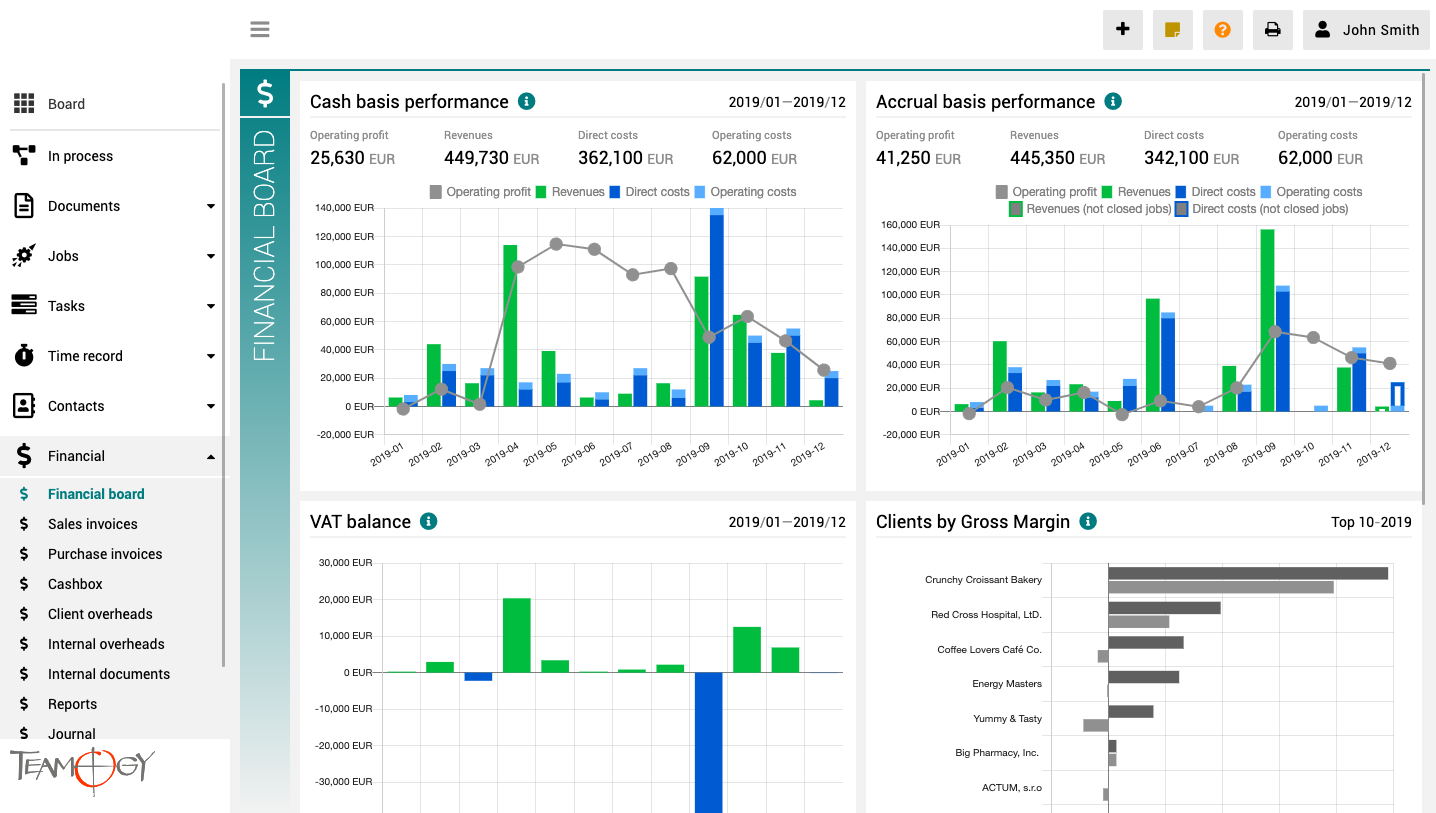
Pulpit finansowy to miejsce, które zapewnia wyraźny obraz całej agencji. Zawiera wykresy z kluczowymi wskaźnikami – ogólną ewolucję przychodów i kosztów agencji, zgodnie z aspektami finansowymi i jobu, różne poglądy na rentowność i wydajność klienta oraz raport VAT.
Wszystkie wykresy mają opcję wyboru zakresu dat, a dodatkowo raporty klientów mają również opcję monitorowania klientów najlepiej i najgorzej ocenianych.
Create a New Internal Overhead
Create a New Internal OverheadYou have two options how to create a new Internal overhead. First is available when you have sufficient rights for Financial section. The second is suitable once you do not have full rights to Financial section. Create a new Internal...
Plată nouă în numerar
Plată nouă în numerar 1. În meniul de navigare din stânga extindeți Financiar. 2. Faceți clic pe Casierie. 3. Faceți clic pe Dispoziție nouă. 4. Selectați Plată nouă în numerar.4. Selectați Decontare factură. Asociați Factura de achiziție cu Proiectul corespunzător....
Credit de numerar nou
Credit de numerar nou 1. În meniul de navigare din stânga extindeți Financiar. 2. Faceți clic pe Casierie. 3. Faceți clic pe Voucher nou. 4. Alegeți Credit de numerar nou.4. Alegeți Rambursare factură. Asociați Factura de achiziție la Job-ul relevant. Dacă ați...
Rambursare pe bază de bon fiscal nouă
Rambursare pe bază de bon fiscal nouă1. În meniul de navigare din stânga extindeți Financial. 2. Faceți clic pe Cashbox. 3. Faceți clic pe New Voucher. 4. Selectați Rambursare pe bază de bon fiscal. Asociați Rambursarea pe bază de bon fiscal cu Job-ul relevant. Dacă...
New Purchase Invoice from View
New Purchase Invoice from View1. In the left navigation menu unroll Financial. 2. Click on Purchase Invoices. 3. Click on Compose New. 4. Choose Purchase Invoice.5. Complete all details. Mandatory fields are red underlined (can be different by company’s settings)....
Create Sales Invoice From View
New Sales Invoice From View1. In the left navigation menu unroll Financial. 2. Click on Sales Invoices. 3. Click on Compose New and choose Sales Invoice.4. Complete all details. Mandatory fields are red underlined (can be different from company’s settings). Pair Sales...
Create Sales Invoice From Job
New Sales Invoice From Job1. In the left navigation menu unroll Jobs. 2. Click on Job schedule, Job statuses or Job list. 3. Choose and open the Job for which you would like to create a Sales Invoice. 4. Click on Compose new. 5. Choose Sales Invoice.Teamogy...
About Time Record
About Time RecordTime is the key asset of every company. Efficient time management of company employees and co-workers is crucial for the delivery of promised jobs and campaigns on time and also has a direct impact on company profit. A Time Record is a record of the...
New Time Record From Job
New Time Record From JobGenerating a Time Record directly from the Job is a great option for people working directly on the Job. Just use the button Time Record icon inside the Job and complete all the mandatory fields. Job details are completed automatically and you...
About Time Recorder
About Time RecorderThe Time Recorder is a visual tool for simple time recording and an overview of all recorded hours in daily, weekly, or monthly mode. It displays all recorded hours of the selected user in a selected time period. Empty columns with a yellow border...
Get in Touch
If you still have any questions or need further assistance, feel free to contact Teamogy support. You can use Online chat (inside the Teamogy or anywhere on www.teamogy.com in bottom right corner) and you will receive a prompt reply.