
O Pulpicie finansowym
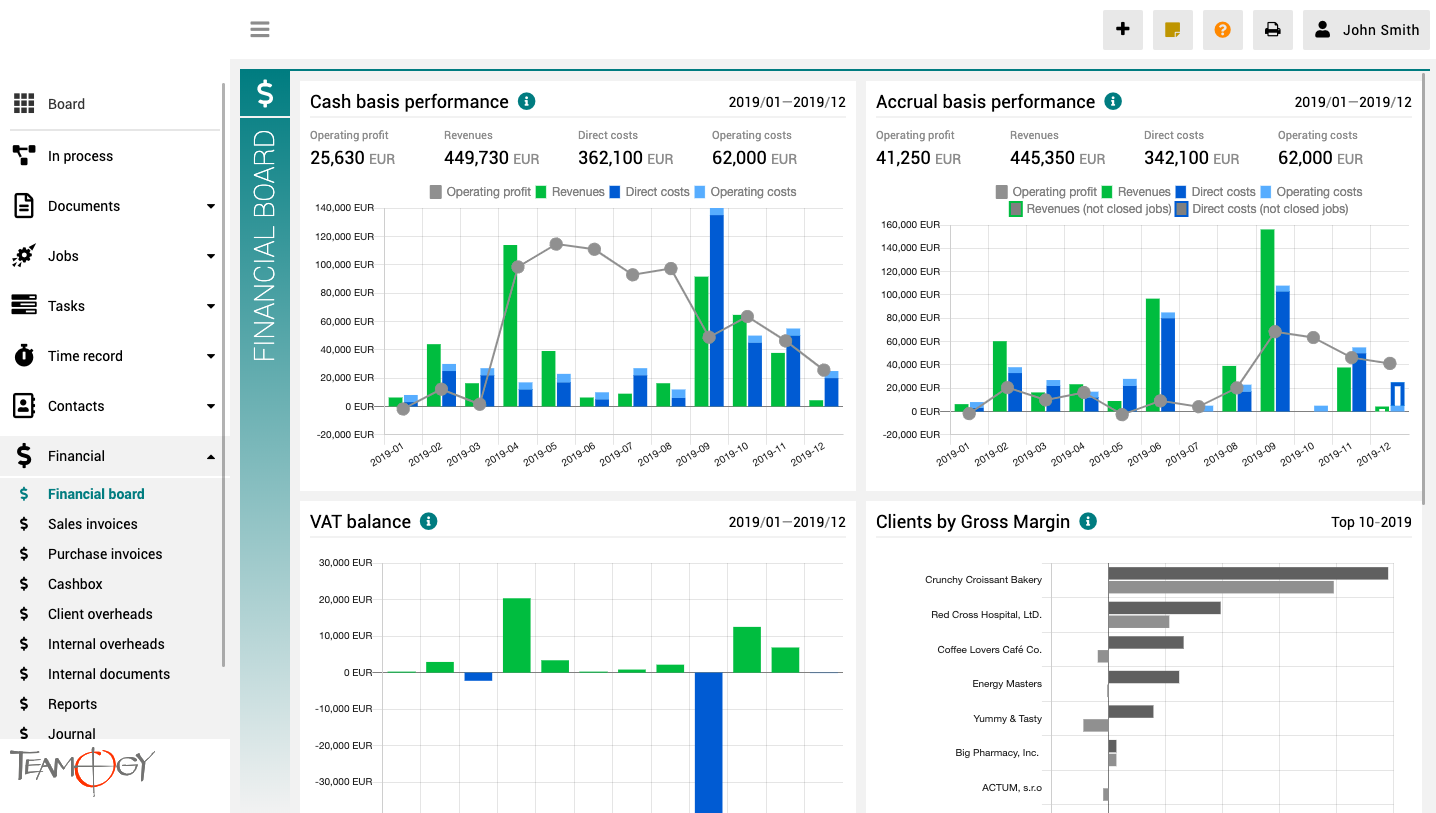
Pulpit finansowy to miejsce, które zapewnia wyraźny obraz całej agencji. Zawiera wykresy z kluczowymi wskaźnikami – ogólną ewolucję przychodów i kosztów agencji, zgodnie z aspektami finansowymi i jobu, różne poglądy na rentowność i wydajność klienta oraz raport VAT.
Wszystkie wykresy mają opcję wyboru zakresu dat, a dodatkowo raporty klientów mają również opcję monitorowania klientów najlepiej i najgorzej ocenianych.

Marco BBN uses Teamogy daily for a real-time overview of the agency.
This year marks 30 years since the brothers Pavel and Petr Marek founded the Marco BBN agency, a relatively unique agency on the Czech market, as its specializations include, among other things, B2B marketing, which has many specifics.
We talked to one of the agency’s founders and its Managing Director Pavel Marek about marketing know-how for B2B clients, interesting case studies, and how membership in the BBN network or the daily use of the Teamogy system helps the agency. And we looked a bit into the near future.
Overview of Electronic Approval Processes
Overview Of Electronic Approval ProcessesIn Teamogy, each type of document or entity can be managed through an approval process. Approval processes are created using a visual tool and incorporate references to approval roles, hierarchies, and other settings, which...
About Electronic Approval Processes
About Electronic Approval ProcessesIn Teamogy, electronic approval processes can be utilized. Electronic approval processes are most commonly used for financial documents such as Sales Quotation, Purchase Orders, Sales Invoices, or Purchase Invoices. The approval...
Teamogy Billing Process
Teamogy Billing Process The billing process for the use of Teamogy and related services is fully automated. And it works as follows. Proforma invoice On the 7th day of each month, a proforma invoice is automatically generated and sent to the client. This proforma...
Management of Billing Addresses
Management Of Billing Addresses You can choose the addresses to which important e-mail communications and financial documents for using Teamogy will be sent. This can be set easily in Teamogy payments section. (Only account owner is allowed to access this page.)The...
Teamogy Flow
Teamogy Flow New Teamogy Flow product is a tool for easy creation of complex integrations (IaaS - Integration as a Service). The Teamogy Flow product, utilizing the visual programming tool Node-RED®, enables the creation of various connections between APIs, online...
E-mails in Teamogy
E-mails In TeamogyWe bring you the possibility to record e-mail communications directly in Teamogy. You can have your e-mails connected directly to tasks, documents, invoices, etc... You can also set your own rules to proceed them. 1. Receiving e-mails and processing...
Version 4.1
What is new in Teamogy? Check the newest Release notes.
Entering The Credit Card
Entering The Credit Card to Teamogy Teamogy payments can be found in your Teamogy environment under the question mark icon (1), Teamogy payments (2). This view is available only for authorized users - Teamogy Account Owner / Clan Owner role.To add your credit card...
Using AI Assistant in Teamogy
AI AssistantWe have newly integrated an AI assistant (ChatGPT-4 Turbo) into Teamogy. Every Teamogy user can now use it to make working with documents more comfortable and efficient.Implementig the new ChatGPT 4.0 Turbo version brings better experience to Teamogy...
Get in Touch
If you still have any questions or need further assistance, feel free to contact Teamogy support. You can use Online chat (inside the Teamogy or anywhere on www.teamogy.com in bottom right corner) and you will receive a prompt reply.