
O Pulpicie finansowym
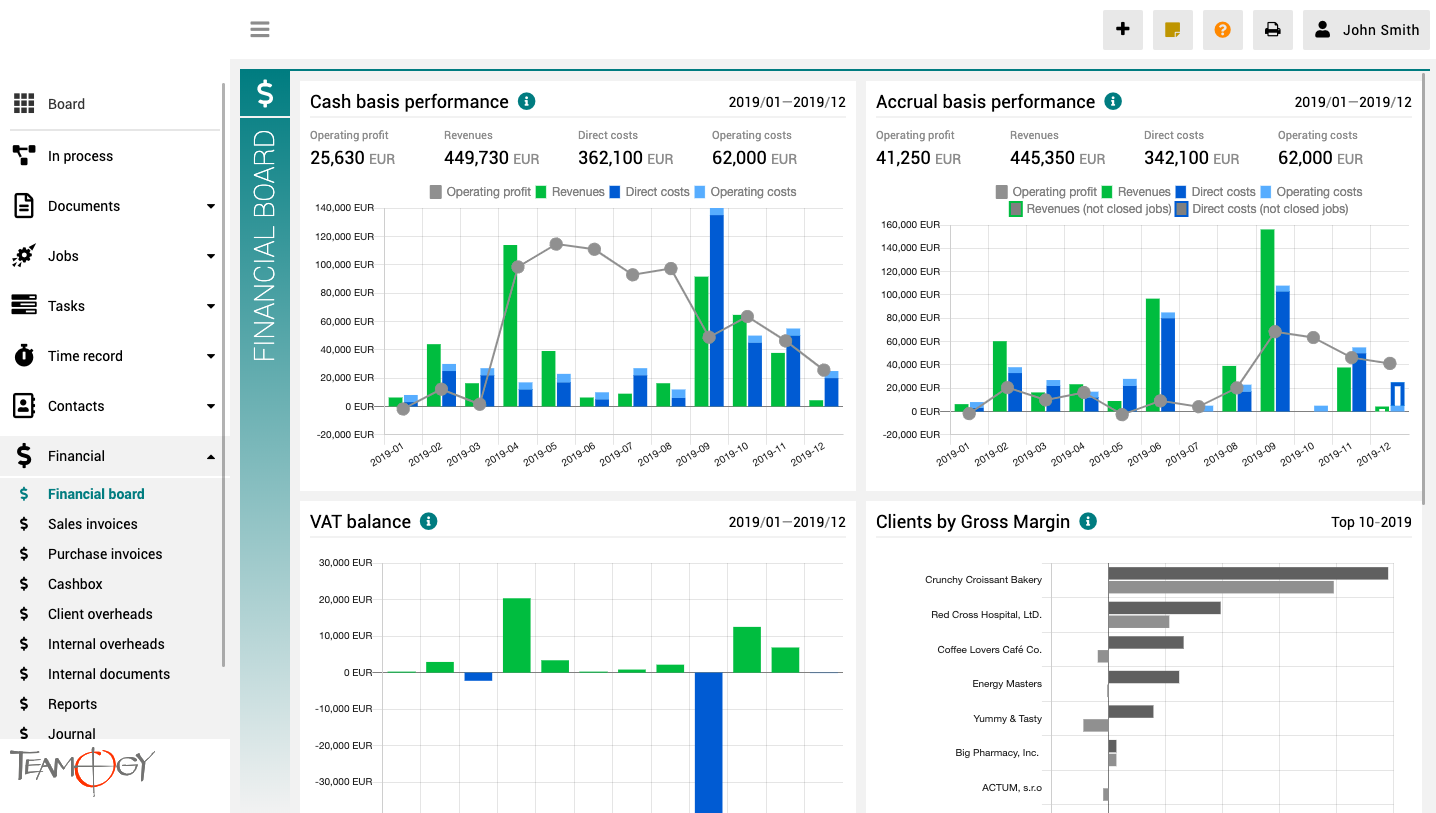
Pulpit finansowy to miejsce, które zapewnia wyraźny obraz całej agencji. Zawiera wykresy z kluczowymi wskaźnikami – ogólną ewolucję przychodów i kosztów agencji, zgodnie z aspektami finansowymi i jobu, różne poglądy na rentowność i wydajność klienta oraz raport VAT.
Wszystkie wykresy mają opcję wyboru zakresu dat, a dodatkowo raporty klientów mają również opcję monitorowania klientów najlepiej i najgorzej ocenianych.
Version 3.7
What is new in 3.7 Teamogy version? ?
How to Cancel Any Company
How To Cancel Any CompanyYou can easily cancel any contact, or brand in every company. 1. Go to the company that you would like to edit the details. 2. Choose the contact and click on the icon – Mark as invalid. 3. Press OK button. 2. Fill in details. Mandatory...

Onboarding the whole team in Teamogy
Well-managed onboarding or team launch is important for the successful deployment and effective use of each new system.
How To Create And Edit Contact From Any Document/Job/Invoice
How To Create And Edit Contact From Any Document/Job/InvoiceYou have an option to create and edit Contact straight from the Document, Job or Invoice. How To Create Contact From Any Document/Job/Invoice 1. Create a new Document, Job or Invoice. 2. Click on the field...
How To Change The Participant Of The Process
How To Change The Participant Of The ProcessYou can easily change the participant of Process, that will approve the next step of the Process. You must have the appropriate permissions for these changes. 1. Go to your Document/Financial Document with the Process. 2. On...
New Opportunity
New Opportunity1. In the left navigation menu, select unroll Opportunities. 2. Click on Opportunity statuses (Kanban) or Opportunity list. 3. Click on New Opportunity.4. Complete all details. Mandatory fields are red underlined (can be different by company’s...
Time Records – Report
Time Records - ReportsTime records - Reports enablee you to see how many hours should be reported and how many hours are already reported. It gives you a perfect overview if someone didn’t report his/her time or reported many hours above the normal limit, etc. You can...
Bulk Changes In Teamogy
Bulk Changes In Teamogy You have an option of bulk changes in Jobs/ Tasks/ Client Overheads/ Internal Overheads. You can mark the data and change their fields. In Jobs, you can change the field - Owner, Participants, Start date, End date, Status or Binder. In Tasks,...
How To Edit Attendances
How To Edit AttendancesYou can edit all the created Attendances of the whole team and also create new Attendances retrospectively. To have rights to edit Attendances, you have to be added in the Group - Attendance editor. 1. Go to the Attendance in the Financial...
Enter Company Details
Enter Company DetailsFirst, open the Company you would like to edit. Read more in Find The Company article.1. Click on the tab Details. 2. Complete all details in the section Details. Mandatory fields are red underlined (can be different by company’s settings)....
Get in Touch
If you still have any questions or need further assistance, feel free to contact Teamogy support. You can use Online chat (inside the Teamogy or anywhere on www.teamogy.com in bottom right corner) and you will receive a prompt reply.