
About Financial Board
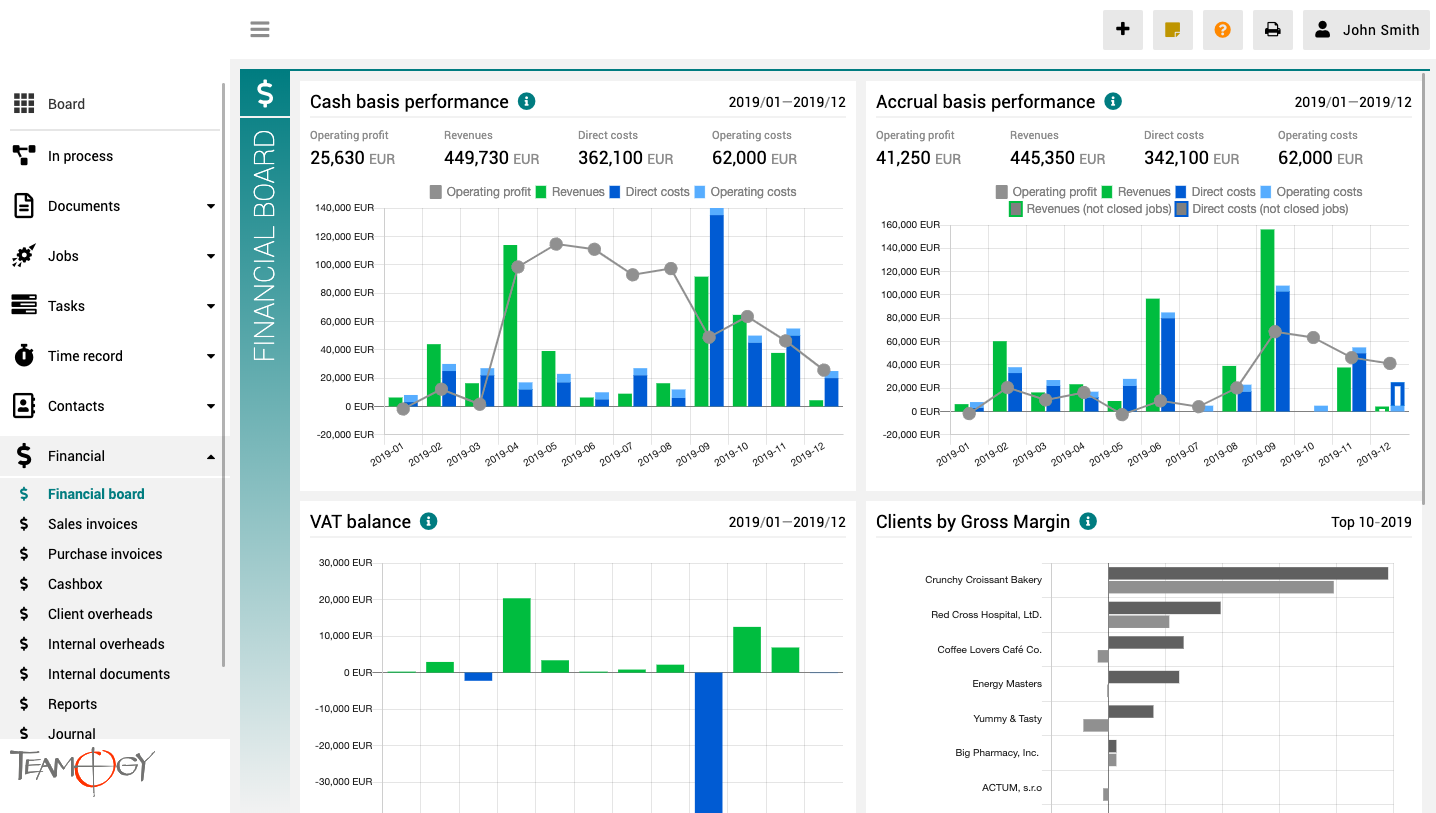
The finance board is a place that provides a clear view of the entire company. It contains charts with key indicators – overall evolution of revenues and costs of the company, according to financial and Job aspects, various views on client profitability and efficiency, and VAT report.
All charts have the option to select a date period while client reports also have the option to monitor the best and worst ranked clients.
Versiunea 5.0
Ce noutăți sunt la Teamogy? Consultați cele mai recente note de lansare.
Task Templates Creation – Configuration Mode
Task Templates Creation - Configuration ModeWhat this can be useful for?You can create task templates and use these templates for job / task implementation. Learn more about how to Create tasks from predefined template feature. Here you will now learn how to prepare...
Data Box
Data Box Integration (Beta) What this can be useful for?Teamogy can be integrated with your company's Data box, allowing you to download incoming and outgoing data messages directly into Teamogy according to the set rules. Downloaded data messages are stored in...
Teamogy Application available on the App Store or Google Play
Teamogy Mobile ApplicationWith the Teamogy app, you stay connected and in the loop, no matter where you are. Teamogy app together with the significant improvements to chat and notifications, is the perfect tool for seamless sharing and communication from wherever you...
Tasks From Predefined Templates
Tasks From Predefined TemplatesWhat can this be useful for? You can quickly create groups of predefined tasks for projects directly from a template. With just one click, you can generate multiple tasks, complete them with descriptions, assign with persons, and more....
Notifications
Notifications In TeamogyStay on track with Teamogy notifications. - easy central setting of default notification behaviour- simply customizable what and where to notify- support for native notifications in MacOS and Windows (for browser, even when browser is turned...
Recurring Tasks
Recurring TasksWhat can this be useful for? You can easily create recurring tasks (subtasks) from a single job (job or task) within a given time frame. This method is suitable for activities where the task is to be repeated periodically (e.g. social media management...
Extra Holiday Entitlements
Extra Holiday EntitlementsThis feature allows you to set and manage extra free hours for your team members.Where and How to set it up? In the Configuration section (1) or HR section (1) / Additional settings (2) - Extra holiday entitlements (3). Press "Extra holiday...
Version 4.2
What is new in Teamogy? Check the newest Release notes.

Marco BBN uses Teamogy daily for a real-time overview of the agency.
This year marks 30 years since the brothers Pavel and Petr Marek founded the Marco BBN agency, a relatively unique agency on the Czech market, as its specializations include, among other things, B2B marketing, which has many specifics.
We talked to one of the agency’s founders and its Managing Director Pavel Marek about marketing know-how for B2B clients, interesting case studies, and how membership in the BBN network or the daily use of the Teamogy system helps the agency. And we looked a bit into the near future.
Get in Touch
If you have problem or need further assistance, do not hesitate contact Teamogy Support. Use online chat (inside Teamogy or everywhere on www.Teamogy.com in the lower right corner) and you will get prompt reply.