
What’s New in Version 6.2
Release date: 2026-04-11
Main new features in the version
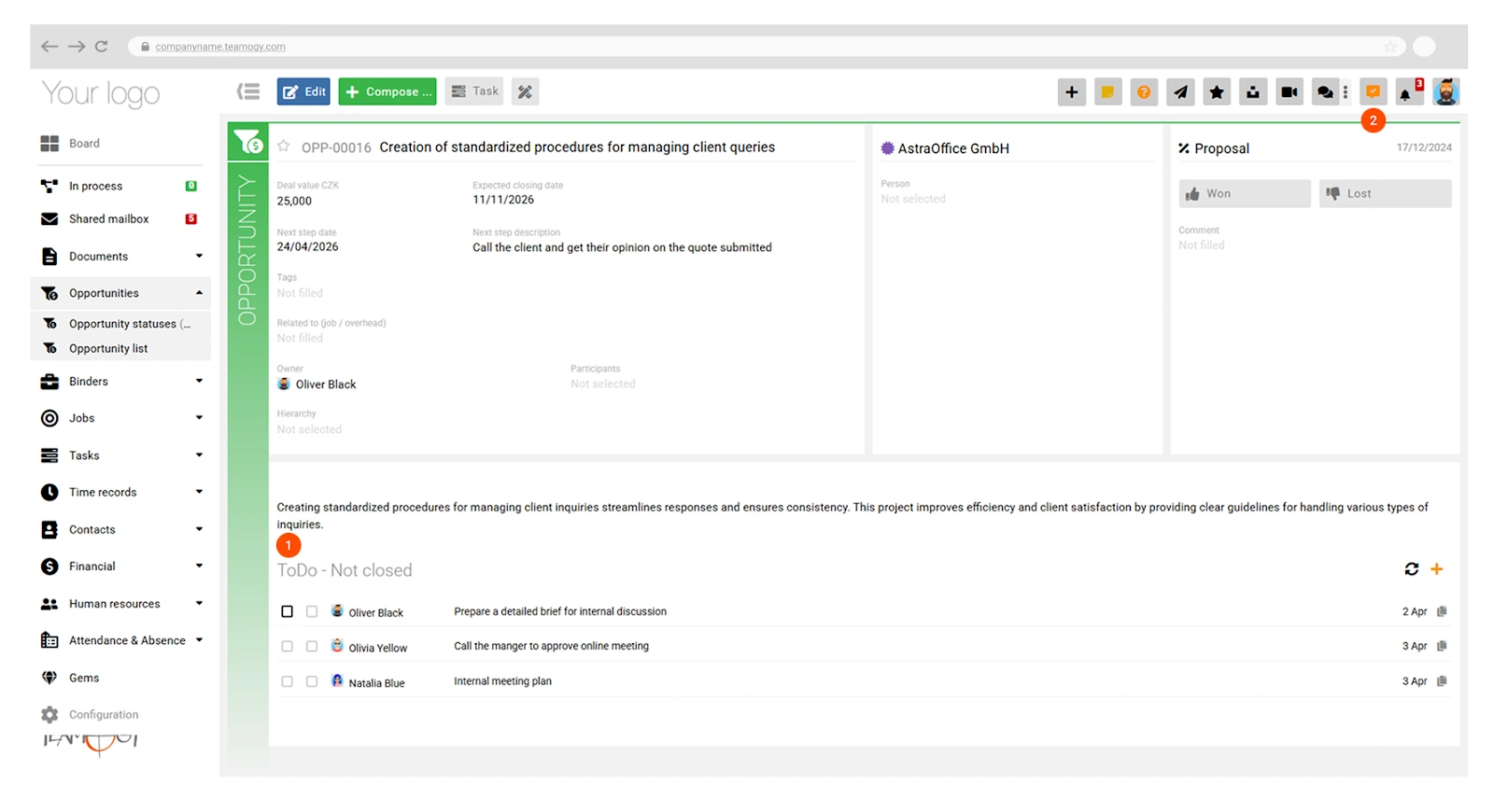
- ToDo – New Functionality Across the Entire System
Introducing ToDo as a new universal feature available throughout the system. ToDos are lightweight tasks that can be assigned to any entity—or created independently—and delegated to another user or yourself. - Quotation – Internal Costs + Budgeted Profit
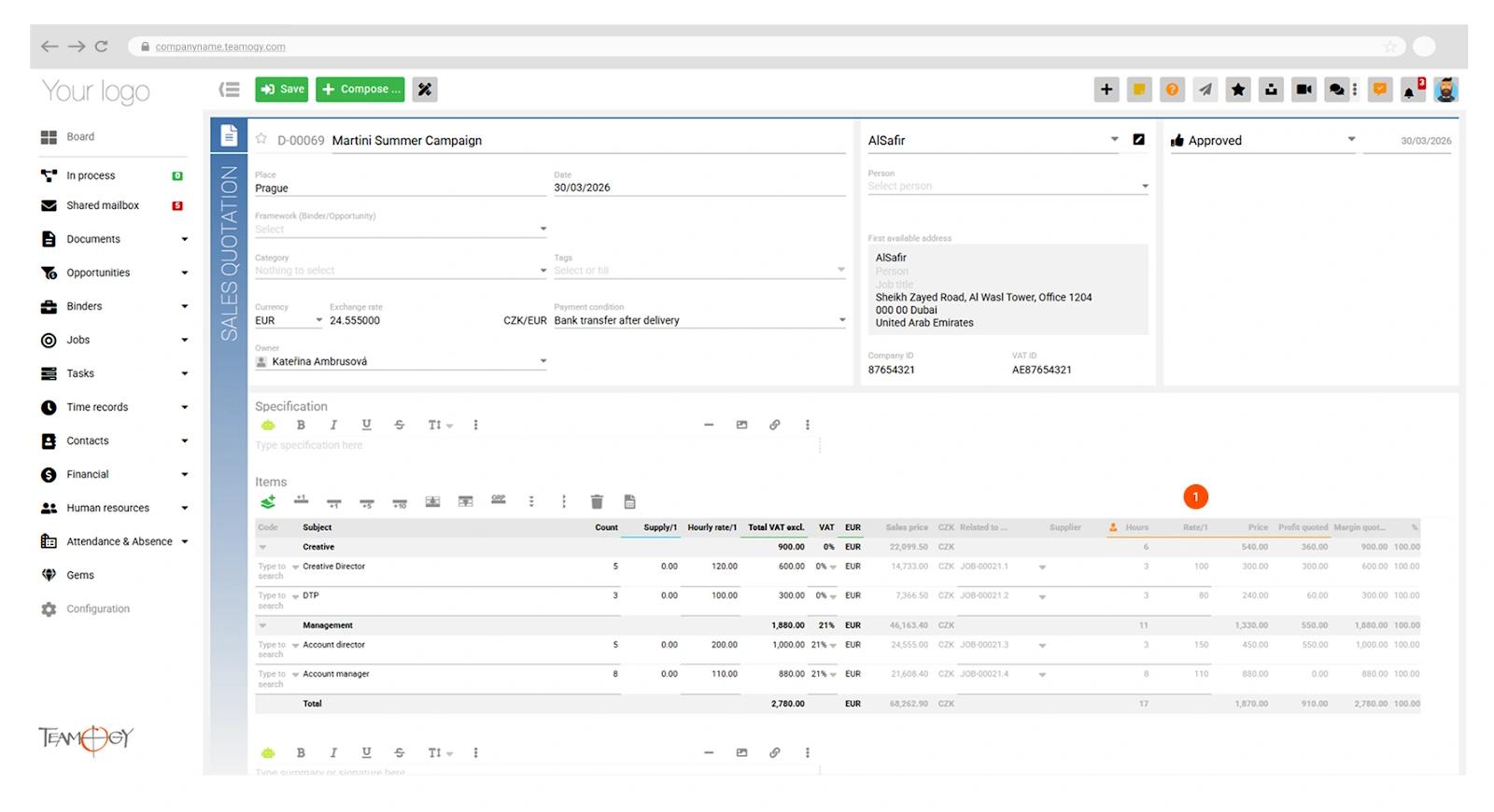
It is now possible to plan internal costs directly in the quotation and display them in the job, including a new Budgeted Profit column. - Quotation – Extended Items Table Options
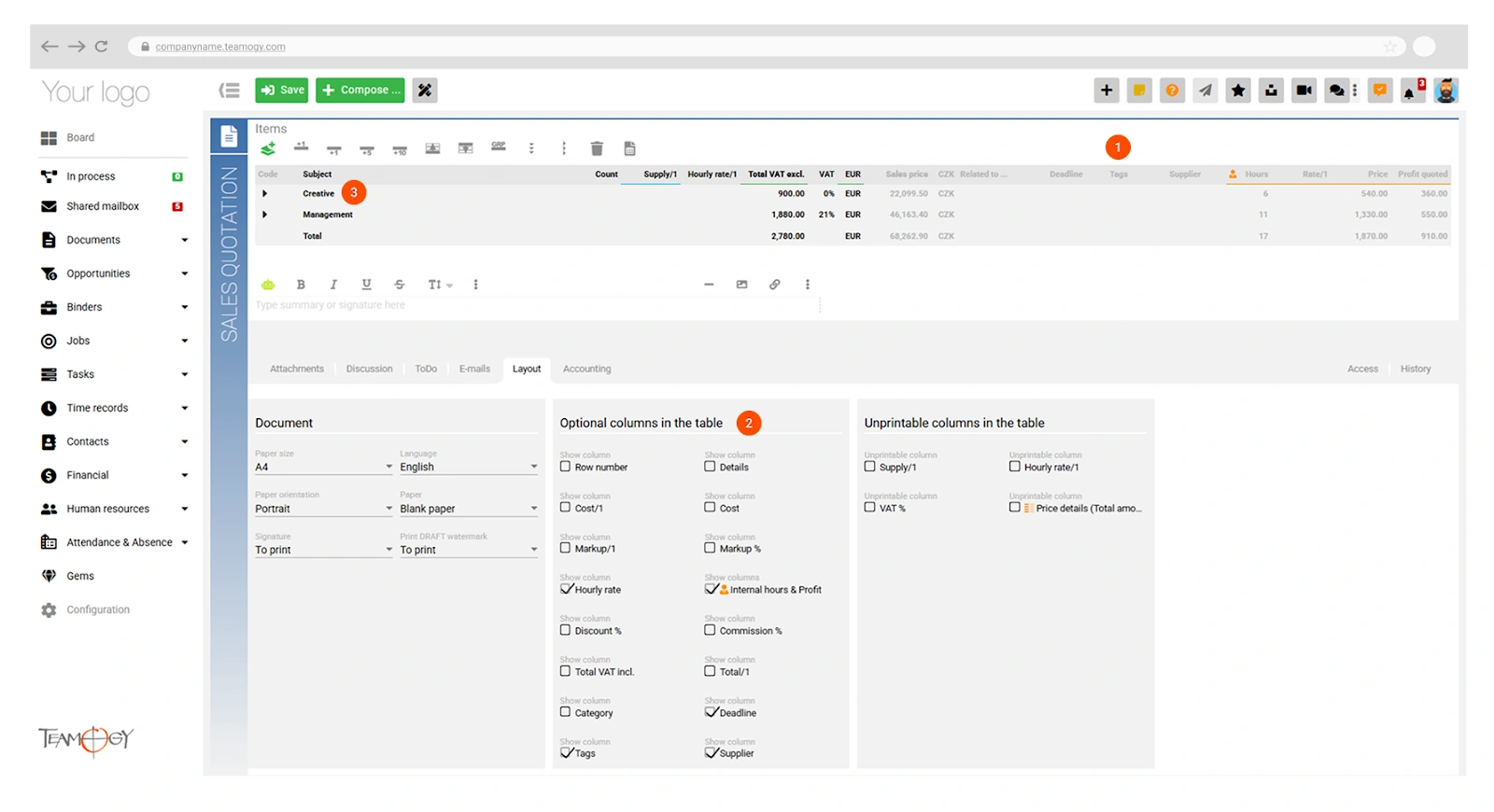
The items table now supports deadlines, tags, and optionally customizable fields. When items are created, the budget group (the name of the grouping row) is also carried over. - Job Items Table
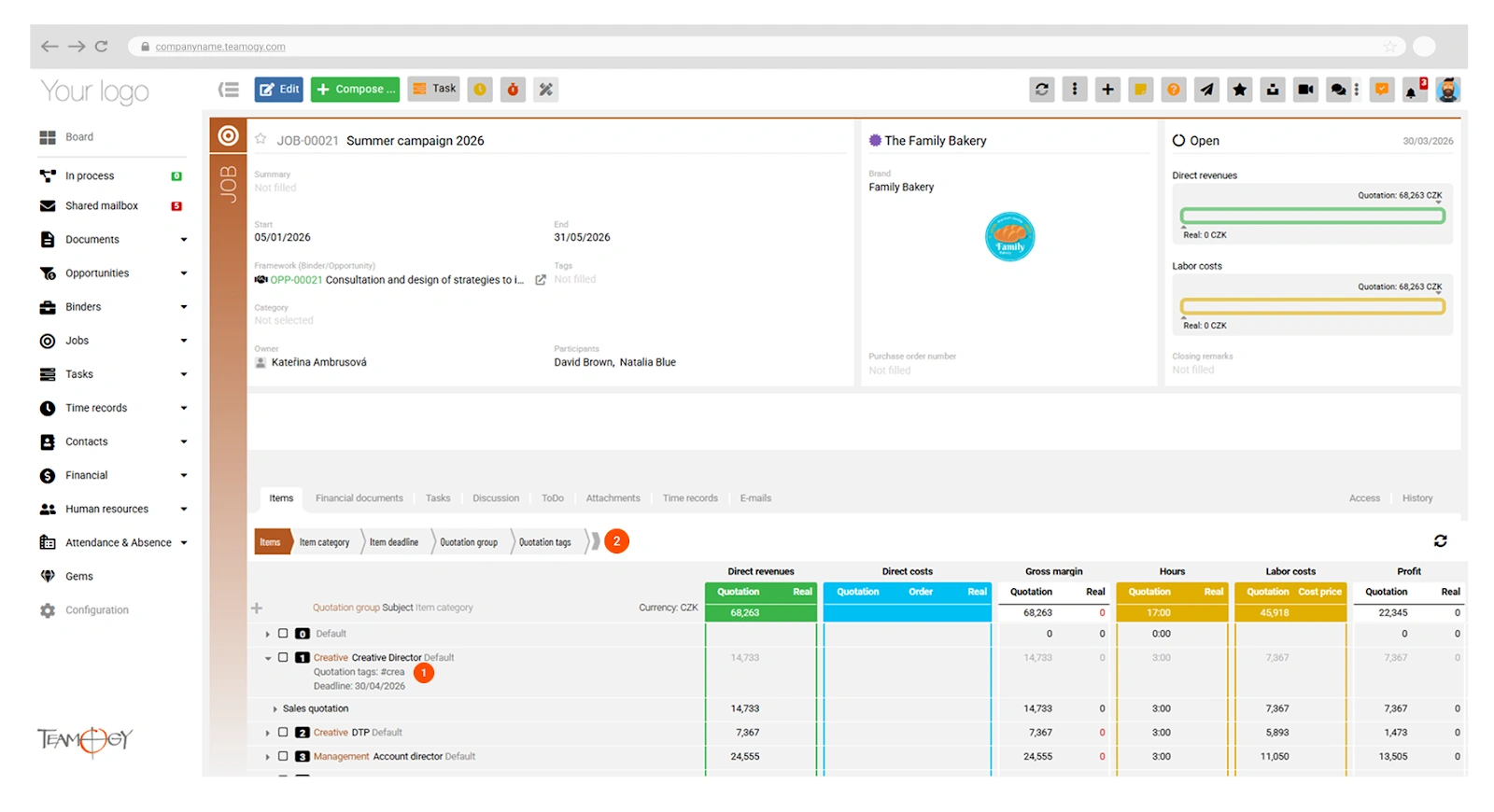
Now includes more detailed information from the quotation, including the budget group, tags, and deadline. - Contacts
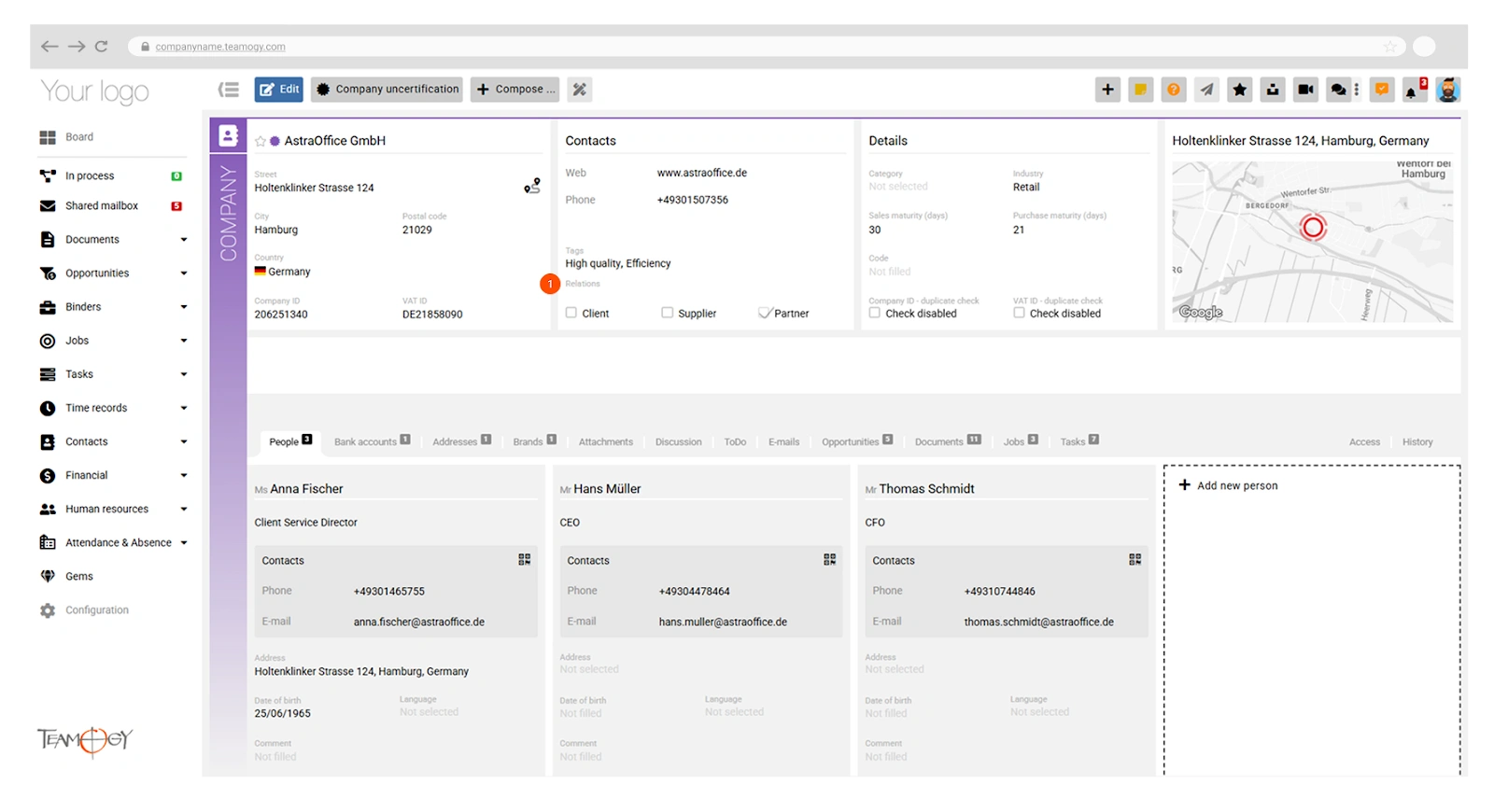
Custom Relationship Types – It is now possible to add custom relationship types to the Company entity. - System Performance
Optimizations to speed up view loading and front-end operations.
Enhancements
- Dashboard – Individual customization of the dashboard layout is now available—you can choose the grid type and the content of each grid tile.
- Dashboard – The absence icon next to colleagues now shows the absence category, making it possible to distinguish between, for example, a home office day and annual leave.
- Quotation – Extended option to hide detailed prices (line-item prices) when generating a PDF. In this case, individual line prices are hidden (even when row details within a group are shown), and only group totals and the overall sum are displayed.
- Job – Budget groups, deadlines, and tags are now transferred from the quotation to the job.
- Tasks – Capacity Plan – It is now possible to display more than 8 weeks ahead.
- Finance – A column showing the number of days overdue and the outstanding amount has been added to the Accounting view.
- Integrations – KSeF support (Polish eInvoice system).
- Chat – Pinned conversations are now displayed at the top, sorted by order.
- Chat – Notifications can now be received for emoji reactions to chat messages.
- UI / UX
- Main Panel Color Customization
It is now possible to change the color of the main navigation panel, choosing from preset options or setting a fully custom color. - Bulk Changes
It is now possible to bulk-set or change the owner of a process activity, and to bulk-manage tags. - Task and Job Categories
Icons and colors can now be set for individual task and job categories. - Filters in Breadcrumbs
Data is recalculated only after the breadcrumb is closed. Filters can also be set as collapsed or expanded by default. - Switching Between Units
When switching between units, the currently open page is preserved where that page is available. - Resizable Side Panel
Users can now adjust the width of the side panel (e.g. for notifications or chat). - Modal improvements
>Selected modals now open at the cursor position (rather than in the center of the screen), can be submitted via keyboard shortcut (Ctrl/Cmd+Enter), and closed with the Escape key.
- Main Panel Color Customization
Minor adjustments and improvements
- Attachments – Preview is now available for attachments in HTML format.
- Absences – Filtering by absence type is now available in overviews.
- Job – Fixed the behavior of the “Restore” button.
- Reports – Decimal places are now disabled by default. They can be enabled individually in user settings or view settings.
- Other – Additional minor UX adjustments across the system, bug fixes, and stability improvements.
Key Features
ToDo – New Functionality Across the Entire System
ToDo is a new universal feature available throughout the system. ToDos are lightweight tasks that can be assigned to any entity—or created independently, without a link to a specific entity—and delegated to another user or yourself. (1) Each user has access to a view of their own ToDos, sorted by deadline. A ToDo has two status flags: Done (marked by the responsible person) and Closed (marked by the creator once they confirm or acknowledge the completion, at which point the ToDo is hidden from further tracking). All ToDos are quickly accessible directly from the main menu (2). The icon shows the count of ToDos due today or overdue.
Quotation – Internal Costs + Budgeted Profit
Quotation – Extended Items Table Options
Job Items Table
Contacts – Custom Relationship Types for Companies
It is now possible to define custom relationship types (1) for the Company entity in the Contacts section. In addition to the standard types (client, supplier), you can now define additional custom relationships in the Teamogy configuration to match your specific needs.
These relationship types can then be used for filtering and sorting contacts, enabling more efficient work with your contact database and better organization across the system.
Previous version
Version 6.1
January 17, 2026
What’s New in Teamogy? Take a look at the latest release notes.
Version 5.2
3.9. 2025
Version 5.1
Jun 25, 2025
Version 5.0
26.12.2024