
O Pulpicie finansowym
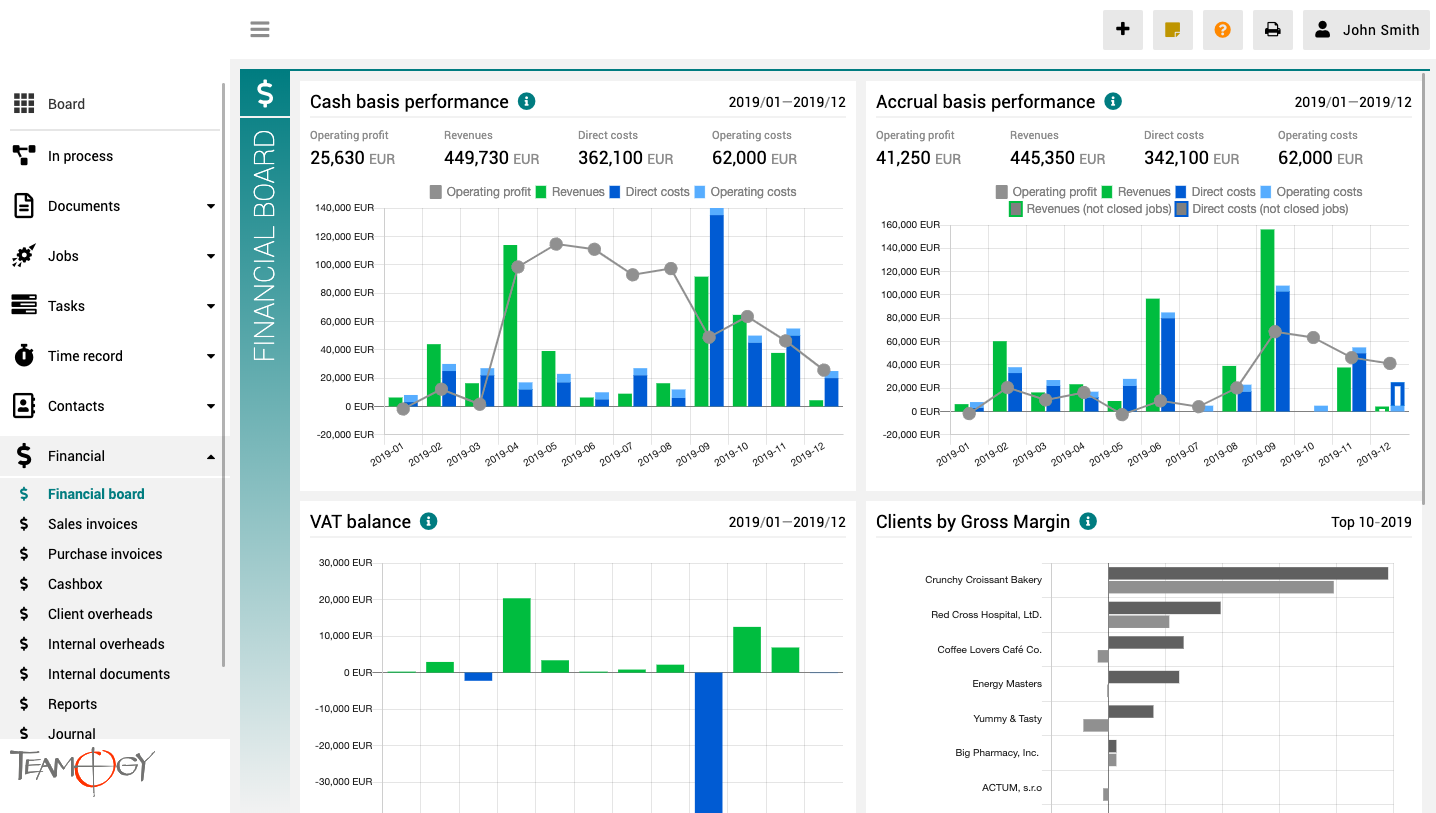
Pulpit finansowy to miejsce, które zapewnia wyraźny obraz całej agencji. Zawiera wykresy z kluczowymi wskaźnikami – ogólną ewolucję przychodów i kosztów agencji, zgodnie z aspektami finansowymi i jobu, różne poglądy na rentowność i wydajność klienta oraz raport VAT.
Wszystkie wykresy mają opcję wyboru zakresu dat, a dodatkowo raporty klientów mają również opcję monitorowania klientów najlepiej i najgorzej ocenianych.
Programmatic User – Secure API Access in Teamogy
Programmatic User – a Secure way to Work with the APIProgrammatic User and API AccessExternal system integrations with Teamogy are implemented using the Teamogy API.Access to the API is secured via an API token (API key). Each API token is always associated with a...
Instructions For API Key Generation
Instructions For API Key GenerationWhat this can be useful for?An API key enables secure communication between Teamogy and external systems or integrations. How to Generate an API Key in Teamogy Log in using the user account under which the API key will be...
Programmatic User – Setup and Configuration
Programmatic User – Setup and ConfigurationWhat this can be useful for?A programmatic user is primarily used in integration projects and represents a professional approach to creating an API key. Creating a programmatic user A programmatic user can be created by a...
Version 6.1
What’s new in Teamogy? Check out the latest Release notes.
Josef Suchopár, Drug Agency – interview
BLOGDrugAgency,a.s - agentura, která se již více než 20 let se věnuje problematice lékových interakcí.Digitální lékárník: Jak Drug Agency mění bezpečnost léčby v ČeskuPETR VEVERA8 MIN READRozhovor mezi Petrem Veverou z Teamogy a Štěpánem Suchopárem, ze společnosti...
Version 5.3
What’s new in Teamogy? Check out the latest Release notes.
Version 5.2
What’s new in Teamogy? Check out the latest Release notes.
Version 5.1
What’s new in Teamogy? Check out the latest Release notes.

How to Create a Truly Secure Password
Let’s take a closer look at how to ensure your data remains properly password-protected and cannot be misused to harm your organization.
Margin Forecast
Margin ForecastYou can easily prepare margin forecasts for individual clients in bulk. These forecasts are automatically reflected in reports where you can compare them with real results. For example, you can easily compare a specific client's annual margin forecast...
Get in Touch
If you still have any questions or need further assistance, feel free to contact Teamogy support. You can use Online chat (inside the Teamogy or anywhere on www.teamogy.com in bottom right corner) and you will receive a prompt reply.