
O Pulpicie finansowym
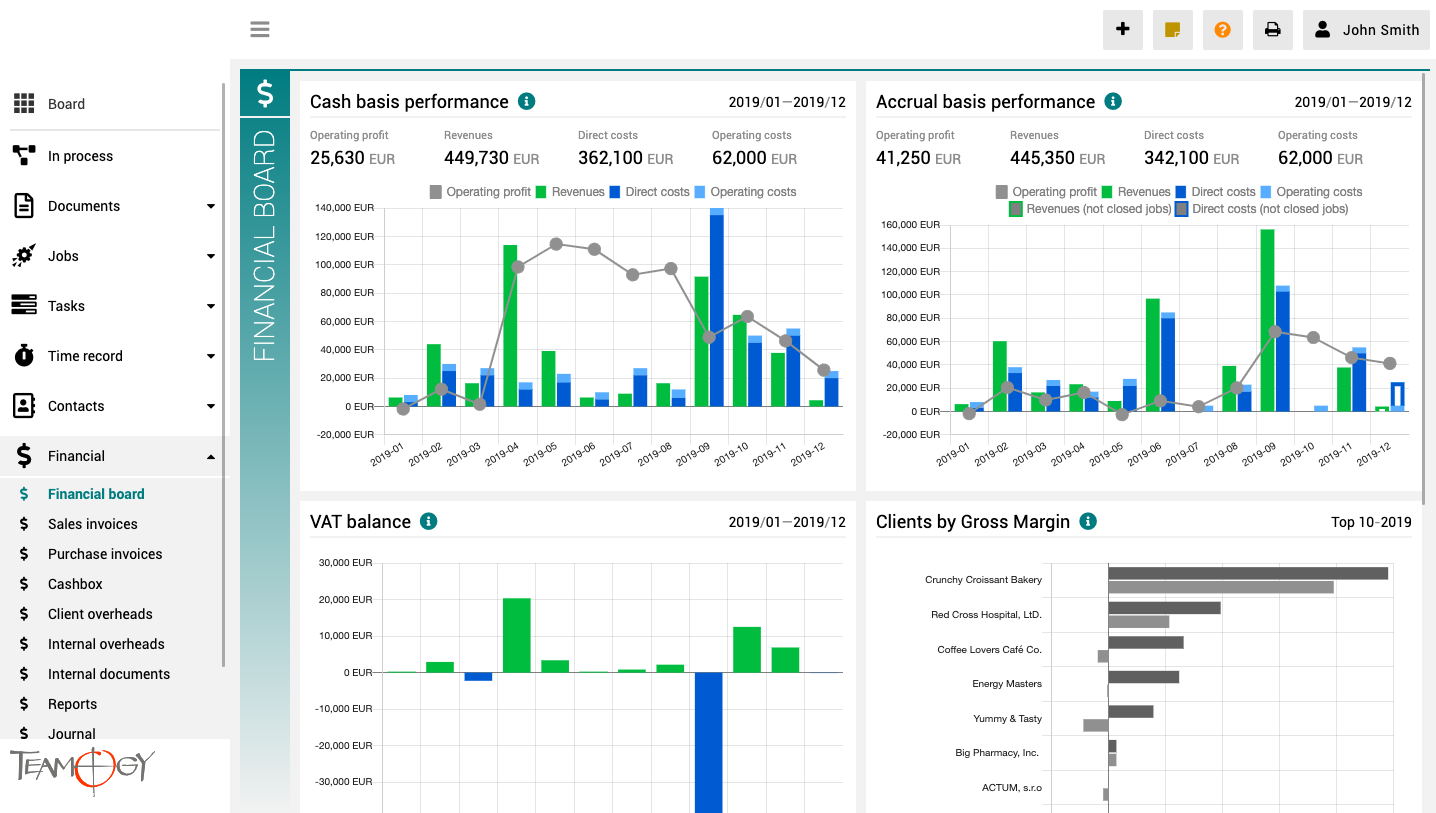
Pulpit finansowy to miejsce, które zapewnia wyraźny obraz całej agencji. Zawiera wykresy z kluczowymi wskaźnikami – ogólną ewolucję przychodów i kosztów agencji, zgodnie z aspektami finansowymi i jobu, różne poglądy na rentowność i wydajność klienta oraz raport VAT.
Wszystkie wykresy mają opcję wyboru zakresu dat, a dodatkowo raporty klientów mają również opcję monitorowania klientów najlepiej i najgorzej ocenianych.
Create A Company
Create A CompanyThere are two option to create a new Company. First option: New company from the view Contacts 1. In the left navigation menu, scroll Contacts. 2. Click on the Companies view. 3. Click on the New company button.4. Complete all details. Mandatory...
Create A Person
Create A PersonOpen the Company for which you want to add a new person. Read more in Find The Company article. 1. Click on Edit. On the tab People click on Add new person. 2. Fill in details. Mandatory fields are red underlined (can be different by country...
Forgotten Password
Forgotten PasswordIn case you forget your password, please follow these steps to successfully log into Teamogy. 1. Choose the option "Forgot your password?" on the login page.2. Enter your user name. You will receive an authentisation code on the cell phone registered...
First Login To Teamogy
First Login To TeamogyEvery new user receives an initial email with login details: username, temporary password and link to the system. 1. Click on the link from initial email. Enter your Username and Temporary password. (temporary password is valid for 8 days)2. Now...
Daily Login Routine
Daily Login RoutineUse your username and password for daily login. If you log in from a new device for the first time, you will also need to enter the authentication code. The code is sent to the cell phone number registered with your username. If you don’t receive...
Get in Touch
If you still have any questions or need further assistance, feel free to contact Teamogy support. You can use Online chat (inside the Teamogy or anywhere on www.teamogy.com in bottom right corner) and you will receive a prompt reply.